2014年8月16日 星期六

OpenWrt 用到 libpcap 的程式

pcapsipdump: one file per sip session
cshark: CloudShark capture tool
collectd-mod-dns: DNS traffic input plugin
fwknopd:
arpd
wknock
airpwn
daemonlogger
lft
whob
arpwatch
aircrack-ng
dsniff
wiviz
karma
bandwidthd
ulogd-mod-pcap
faifa
rarpd
scdp
scanlogd
snort
snort-mysql
snort-pgsql
snort-wireless
snort-wireless-mysql
snort-wireless-pgsql
pyrit
nmap, nmap-ssl
ncat, ncat-ssl
nping
ucarp
ettercap:用來 injecting traffic
6tunnel
netdiscover:
cdp-tools
tcptraceroute
kismet-drone, kismet-server
scanlogd
raddump
darkstat
ngrep
netdiscover
knock, knockd
softflowd
tstat
wing
ipcad
pmacct-client, nfacctd, pmacctd, sfacctd, uacctdpmacctd-pgsql, nfacctd-mysql, pmacctd-mysql, sfacctd-mysql, uacctd-mysql, nfacctd-pgsql, sfacctd-pgsql, uacctd-pgsql, nfacctd-sqlite, pmacctd-sqlite, sfacctd-sqlite, uacctd-sqlite
nprobe
hping3
reaver
ptunnel
aircrack-ptw
fprobe
ssldump
imsnif
thc-ipv6-*
tcpdump
iftop

參考:libpcap

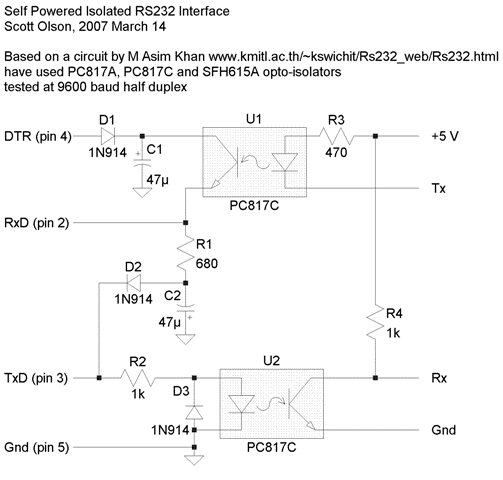
RS-232 Power

從 RS-232 取得電源

RS-232 訊號的電壓相對於 GND 是 -3V~-15V (mark, logic 1) 及 +3V~+15V (space, logic 0),負載 3~7 kΩ。有些接收端用 1.7V 跟 1.2V 區別 high 跟 low,跟 TTL 相容,但要加反向器。RS-232 驅動輸出電阻至少 300Ω,電壓至少 ±5V,最多 ±25V,但較少超過 ±12V 的。

DB-9 訊號
  1. DCD (Data Carrier Detect):輸入
  2. RxD:輸入
  3. TxD:輸出
  4. DTR (Data Terminal Ready) 輸出
  5. GND
  6. Data Set Ready
  7. RTS (Request To Send) 輸出
  8. CTS (Clear To Send)
  9. RI (Ring Indicator)
輸出的接腳都能拿來提供電源,有 DTR、RTS 跟 TxD,能提供多少電流跟使用的 RS-232 驅動能力有關。

參考電路

應用:

2014年8月15日 星期五

Linux POSIX semaphore

Linux semaphore sem_t 有一個 ≥0 的整數,sem_post() 將它加 1,sem_wait() 等候到 >0 時將讓它減一。另外還有 sem_trywait() 不等候,sem_timedwait() 等候到特定時間。

Linux semaphore 有兩種:memory-based 和 named。
  • Memory-based,或稱非 named:在某個記憶體位置,透過 sem_init() 初始化、sem_destroy() 銷毀。依照記憶體位置的不同,又可分成 thread-shared semaphore 跟 process-shared semaphore。前者只要是單一 process 內的某個位址,旗下的 thread 都可以存取。後者需要放在不同 process 都可以存取的 shared memory (可透過 shmget()、shm_open()、或 mmap() 取得),或者 fork 的子程序繼承了記憶體對應,也可以存取。
    • sem_init(sem_t *, int pshared, unsigned int value)
    • sem_destroy()
  • Named:有個名稱在 /dev/shm/sem.名稱,透過 sem_open() 建立或開啟、sem_close() 關閉、sem_unlink() 移除。
    • sem_open()/sem_close()/sem_unlink()
sem_post()
sem_wait(sem_t *):回傳 0 表示等候到 semaphore 並減一。
sem_trywait(sem_t *):類似 sem_wait(),但 semaphore 為 0 時不等候,回傳 -1 及 errno = EAGAIN。

sem_timedwait(sem_t *, const struct timespec *):類似 sem_wait(),但最久只等候到某個 Epoch 時間,等候不到的話回傳 -1 及 errno = ETIMEDOUT。
  • 可用來在特定時間執行某項工作。
  • 等候是呼叫 nanosleep() 處理

sem_getvalue():取得目前 semaphore 值。

等候 semaphore 成功回傳 0;失敗 semaphore 不變,回傳 -1 並設 errno。

errnosem_wait()sem_trywait()sem_timedwait()
EINTRsignal 中斷
EINVALsemaphore 無效semaphore 或時間 tv_nsecs 無效
EAGAIN-semaphore 為 0-
ETIMEDOUT--逾時

註:uClibc 不支援 pshared 和 named semaphore,SEM_VALUE_MAX 是 2147483647。內部使用 __pthread_lock()、一個 semaphore 計數值、以及一個 waiting queue。

應用:binary semaphore (比較:mutex), counting semaphore

參考

  1. man sem_overview, man sem_init, man sem_wait

2014年7月30日 星期三

Lubuntu 使用

調整

終端機

  • sakura https://newtoypia.blogspot.com/2018/09/sakura.html
    • 設定檔 ~/.config/sakura/sakura.conf。關閉最後分頁時產生或覆蓋。
  • lilyterm:按照說明下載 0.9.9.4 編譯安裝
    • 2021/09/01 Focal 需要 git 下載編譯安裝才可以。
    • 2020/10/08 for lubuntu 20.04 LTS 'Focal Fossa': 直接使用套件 Backspace 鍵、git grep 等不正常,下載 Testing 版編譯安裝可正常使用。
    • 2020/10/08-1:git 下載編譯安裝也可以
      git clone https://github.com/Tetralet/LilyTerm.git
      cd LilyTerm
      ./configure --prefix=/usr --sysconfdir=/etc/xdg
      make
      sudo make install
    • 2019/05/28 for 18.04 LTS 'Bionic Beaver':直接使用套件
    • 常常當掉
  • LXTerminal
  • QTerminal

開發環境

檔案軟體

  • pdf
    • Firefox
    • 安裝 adobereader (只有 32-bit 版本,所以需要安裝 i386 環境):到官網下載後,會自動出現 GDebi 來安裝[參考]。我安裝的是繁體中文版 AdobeReader 8.1.7-1.i386。另外有英文版 9.5.5
    • pdf 編輯:參考《Linux 下編輯 PDF 檔的工具》,我安裝 pdfshuffler
  • odp 簡報:sudo apt-get install libreoffice-impress
  • 影音編輯 AVIDEMUX:試過剪裁可用
  • chm:chmsee
  • 備份光碟
  • 編碼轉換:iconv -f big5 -t utf-8 big5.txt -o utf8.txt #big-5 轉 utf-8
  • 圖片列印
  • Typora 跨平臺的 Markdown 檔案編輯器 [官方連結](沒用過)
    wget -qO - https://typora.io/linux/public-key.asc | sudo apt-key add -
    sudo add-apt-repository 'deb https://typora.io/linux ./'
    sudo apt-get update
    sudo apt-get install typora
    
  • Joplin 跨平臺的筆記軟體,支援 Markdown 語法 [官方連結]。(沒用過)
    wget -O - https://raw.githubusercontent.com/laurent22/joplin/master/Joplin_install_and_update.sh | bash
  • HackMD 是台灣人開發的線上共筆軟體,不需要安裝,支援 Markdown 語法,官方連結
  • 尚未使用
    • TMidity++:Midi
    • Tracker:動態影像分析軟體
    • ImageJ:靜態影像分析軟體
    • SciDAVis:科學數據分析軟體
    • GeoGebra:函數繪圖軟體
    • Stellarium:星座盤
    • yEd:流程圖繪製軟體
    • Blender:3D 建模軟體
    • Freeplane:心智圖軟體

網路服務

安裝工具軟體
  • VirtualBox 虛擬電腦
  • 虛擬 Windows 作業系統:wine與ie
  • gnome screenshot:做螢幕區塊擷取
  • 星座盤 
參考來源
  1. Lubuntu 13.10 安裝與使用
其它參考:
最後更新 20201008

2014年7月23日 星期三

AM335x Programmable Realtime Unit

AM3356/7/8/9 (如 BeagleBone Black) 都有 PRU-ICSS (Programmable Real-Time Unit Subsystem and Industrial Communication Subsystem)。

  • Supports Protocols such as EtherCAT®, PROFIBUS, PROFINET, EtherNet/IP™, and More
  • 2x PRU:兩個額外有自己的程式碼和記憶體的處理器,可用來作接近硬體的、即時的工作,減輕主處理器的負擔。
    • 32-Bit Load/Store RISC Processor @ 200 MHz
    • 8KB of Instruction RAM With Single-Error Detection (Parity)
    • 8KB of Data RAM With Single-Error Detection (Parity)
    • Single-Cycle 32-Bit Multiplier With 64-Bit Accumulator
    • Enhanced GPIO Module Provides Shift-In/Out Support and Parallel Latch on External Signal
  • 12KB of Shared RAM With Single-Error Detection (Parity)
  • Three 120-Byte Register Banks Accessible by Each PRU
  • Interrupt Controller (INTC) for Handling System Input Events
  • Local Interconnect Bus for Connecting Internal and External Masters to the Resources Inside the PRU-ICSS
  • 內部週邊
    • 1x UART Port With Flow Control Pins, Supports up to 12 Mbps
    • 1x Enhanced Capture (eCAP) Module
    • 2x MII Ethernet Ports that Support Industrial Ethernet, such as EtherCAT
    • 1x MDIO Port

應用

2014年7月16日 星期三

One AVR Web Server

http://www.theresistornetwork.com/2013/03/fun-with-embedded-http-servers.html
http://hackaday.com/2013/04/03/embedded-web-server-is-all-about-clever-formatting/ 
  • 硬體:Olimex MOD-IO development board (ATmega16 CPU) + ENC28J60 Ethernet controller (SPI 界面)
  • 使用 TuxGraphics TCP/IP stack,包含 Web Server
  • 壓縮網頁資料 (yui-compressor + gzip) 給 C 使用
    %.css.h: %.css
        yui-compressor --type css $^ > $^.min
        gzip -c $^.min > $^.gz
        xxd -i $^.gz | sed -e 's/.\[\]\ =/\[\]\ PROGMEM\ =/g' | sed -e 's/unsigned/const/g' > $@
        rm -f $^.gz $^.min
    
  • 由於只有 1kB RAM,限制 response 大小大約 700 bytes.
  • 顯示 AVR logo:用 Inkscape 縮小 SVG 檔,並用 vim stripped the rest of the cruft
  • 用 AJAX 動態取得 JSON 格式的 Uptime、Total HTTP Requrest 及 Relay Status
  • HTTP authentication 以及控制 relay
相關文章:Eembeddedd Web Server

2014年7月14日 星期一

libubox runqueue

主要是三個函數:runqueue_init()、runqueue_task_add()、runqueue_process_add()

runqueue_init():初始化

runqueue_task_add():將 task 加到 runqueue,並在 1 ms 後嘗試執行,可限制最多同時跑多少 task,也可以限制 task 最久跑多久。嘗試執行時 runqueue 已經空了,沒有 task 待執行或執行中,1 ms 後執行 empty_cb()。

runqueue_process_add():讓 runqueue 知道 task 結束,方便啟動下個 task。

應用參考:OpenWrt /sbin/init

相關:safe_list、uloop
參考來源:libubox

SIP header Via

所有 SIP 訊息 都要有 Via,縮寫 v。一開始的 UAC 和後續途經的每個 proxy 都會疊加一個 Via 放傳送的位址,依序作為回應的路徑。 格式 sent-protocol sent-by [ ;branch= branch ][ ; 參數 ...] s...